
Motivate MD Services
In this article9
Next Steps for Your Motivate MD Services
Your portal is your all-in-one hub for managing your services, submitting requests, scheduling calls, and communicating with your team.
Please complete the steps below to get started.
Step 1: Accept Your Portal Invitation
Within a minute or two of your purchase, you will receive a separate email inviting you to create your Motivate MD Portal login.
- Open the invitation email
- Create your password
- Log in to your dashboard
If you do not see the invitation, check your spam folder. If it is not there, contact support ([email protected]) and we will resend it.
Step 2: Review Your Dashboard
Once logged in, take a few minutes to explore. You will see:
- My Plan
- Build your application roadmap in one place. Use My Plan to organize tasks, track deadlines, and stay focused on what to do next throughout your application journey.
- Submission area
- Submit requests for essay editing, advising, interview prep, tutoring, and more. You can also track progress, timelines, and completed deliverables from start to finish.
- Messaging access
- Message your support team directly whenever you need guidance or updates. Keep all communication in one place so nothing gets missed during your application journey.
- Essays
- Manage every essay draft from first pass to final polish. Track feedback, monitor progress, and submit essays for review when you’re ready.
- Schools
- Build and organize your school list with confidence. Explore programs, save schools you’re considering, track important deadlines, and access the most current MD and DO secondary essay prompts all in one place.
This is your central command center for everything related to your package.
Step 3: Complete Your Profile Before Submitting Requests
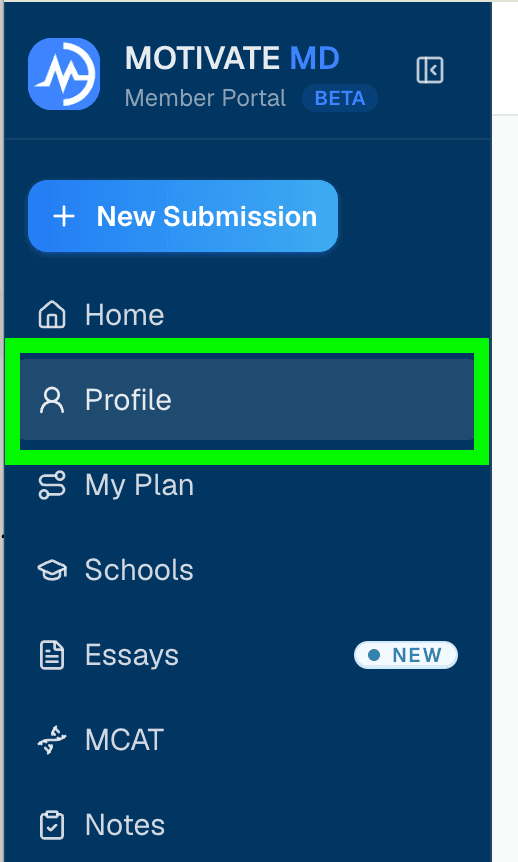
Before our team begins working with you, we review your Profile to understand your goals, timeline, school preferences, and priorities.
This allows us to tailor our feedback and guidance specifically to you.
The more thoughtfully you complete this section, the more strategic and personalized your support will be.
Estimated time to complete: 10 minutes.
Please complete your Prfile before submitting your first request.
If you purchased tutoring, please complete the MCAT Plan section within your Application Plan before scheduling or submitting your first tutoring request.
Purchased an All-In-One Package?
If you purchased an All-In-One package for medical school or residency applications, review your package roadmap to understand the recommended sequencing and how to strategically use your services.
- Medical School Application All-In-One Package Roadmap
- Residency Application All-In-One Package Roadmap
This roadmap outlines recommended timing and priorities to help you maximize your package.
Step 4: Submit Your First Request
When you are ready, submit your request directly inside the portal.
Depending on your package, this may include:
- Essay edits
- Advising sessions
- Mock interviews
- Tutoring
- Other included services
How Communication Works
All service communication takes place inside your portal.
When someone on our team sends you a message, you will receive an email notification prompting you to log in and respond.
Please log in to reply. Do not respond directly to notification emails, as replies will not be recorded in your portal thread.
Keeping all communication in one place allows us to help you more efficiently.
Where Calls (Video and Audio) Take Place
All calls take place inside the portal.
For services like essay editing, if you’d like to talk through feedback live, you can schedule a follow-up call at any time by submitting a new Essay Services submission and selecting “Follow Up Call.” You can also request a specific team member if you’d like to continue working together.
At the time of your scheduled call:
- Log in to your portal
- Go to "Calls" in the menu
- Join your scheduled session
You will receive an automated email reminder prior to your session.
Scheduling & Session Expectations
We ask that any session changes or cancellations are made at least 24 hours in advance so we can respect your team member’s time and availability.
If a session is missed or canceled last minute, it will count as a completed session.
That said, we completely understand that things come up, and we’re always happy to offer a one-time grace exception when needed. If anything changes, just reach out as soon as possible and we’ll help however we can.
Need Help?
If you have questions or need to update a submission, use the Contact Support feature inside your portal.
You can also visit the Help Center for quick answers to common questions, troubleshooting guidance, and step-by-step instructions.
Our team will respond promptly to keep everything moving forward.
We look forward to supporting you throughout your application journey.
Help Us Improve
Our portal is currently in beta as we continue enhancing features and refining the user experience.
If you notice anything that seems off, you can:
- Use Report a Bug for technical issues
- Use Help Us Improve to share suggestions
- Message Support directly through your portal for assistance
We appreciate your feedback and are committed to continuously improving your experience.